
Permissions define coverage
Scanning reads the sources you authorize. Installation and lifecycle permissions also manage the scanner's own infrastructure. Extra accounts and SharePoint need separate authorization.
Trust Center
Where your data lives, how access works, and what we store.
Direct answers on deployment, data storage, and access.
Last reviewed: Reviewed by Theodolite engineering
| Question | Answer |
|---|---|
| Where does the scanner run, and where does my data live? | The scanner runs in your own AWS or Azure account. Detailed findings, inventory, access evidence, and file-processing diagnostics stay in your scanner's database. When you view them, Theodolite relays them in memory over TLS to your browser — never storing that detail centrally. |
| What does Theodolite store centrally, outside my environment? | Runtime and scan telemetry (status, run IDs, timing, errors), observed resource totals, optional derived security measures, and your organization's registration and sign-in records. Submitted contact and partner requests, plus privileged-access audit records. No detailed per-file results are stored centrally. |
| Where is Theodolite's central infrastructure hosted? | Our central application, API, and database are hosted on Microsoft Azure in the Central US region. This central region isn't currently selectable by customers. Where your own scanner deploys is a choice you make within your supported cloud account. |
| Is my data encrypted in transit and at rest? | Yes for our central services: HTTPS/TLS 1.2+ is required for the app and API, and the central database encrypts data at rest with Azure-managed keys. Exact settings in your own cloud account depend on your configuration there. |
| Who at Theodolite can access my account? | Everyday application access is scoped to your organization. Privileged support access uses a named administrator identity tied to a specific target, and that grant and its use are audited. |
| How do you handle credentials during installation? | Source-connector secrets live in your own cloud's Key Vault or Secrets Manager. During Azure Portal installation, Theodolite stages three files in private, restricted Azure Blob storage: parameters.json (scanner setup/signing credentials, registry-pull credentials, and the scanner database password), template.json, and launcher.json (deployment/launch instructions). Read-only links expire within 2 hours; that expiry isn't guaranteed deletion. Cleanup runs after connection, expiry, or offboarding, with failures recorded and retried. |
| How do I sign in, and is MFA supported? | Sign-in uses Microsoft authentication; MFA follows your organization's own Microsoft identity policy. Our internal admin tools require OTP independently. Sessions carry a 30-minute idle timeout. |
| What security assurance can you provide? | We share architecture and data-flow documentation and a deployment-specific review through our security-review request, and can discuss further detail under NDA. |
| How do I report a vulnerability? | Use our security contact form to report a vulnerability or security concern. |
Data flow
Scanner status and last check-in. Reported software version and deployment IDs.
Run, source and account IDs; run status, including partial completion; start and end times; errors.
Observed counts of subscriptions, resources, storage accounts, databases and compute, and storage observed as public or unencrypted.
When available: security-check pass and fail totals; sensitive-data indicator and affected-location count ranges; source coverage and known limitations; vulnerability presence, severity and coverage.
For organizations where that computation has been enabled and has generated results, the resulting risk figures and their basis are retained as additional central records.
Derived measures describe your security posture, not file contents.
Account, organization, scanner registration, sign-in and authentication records.
Submitted contact and partner requests, plus privileged-access audit records (actor, target, times and recorded IP).
Detailed findings, inventory, access evidence and file-processing diagnostics are stored in your scanner's database. On an authorized request, Theodolite relays them in memory over TLS to the requesting user's browser and does not store them centrally.
Access and safeguards
Shared principles for customer-hosted scanners in AWS and Azure.
Scanning reads the sources you authorize. Installation and lifecycle permissions also manage the scanner's own infrastructure. Extra accounts and SharePoint need separate authorization.
Connector secrets stay in your Key Vault or Secrets Manager. Azure Portal setup files can temporarily contain installation credentials in private storage. Links expire within two hours; expiry is separate from deletion, and failed cleanup is retried.
Everyday access is scoped to your organization. Privileged support uses a named administrator and specific target, with the grant and its use audited. Customer sign-in uses Microsoft; MFA follows your Microsoft identity policy.
Central services require TLS 1.2+; the central database uses Azure-managed encryption at rest. Offboarding revokes scanner access and does not automatically delete central records.
See deployment steps and required permissions for Azure and AWS
Keep the explanation
Share the diagrams with your team, or keep the security overview for your review.
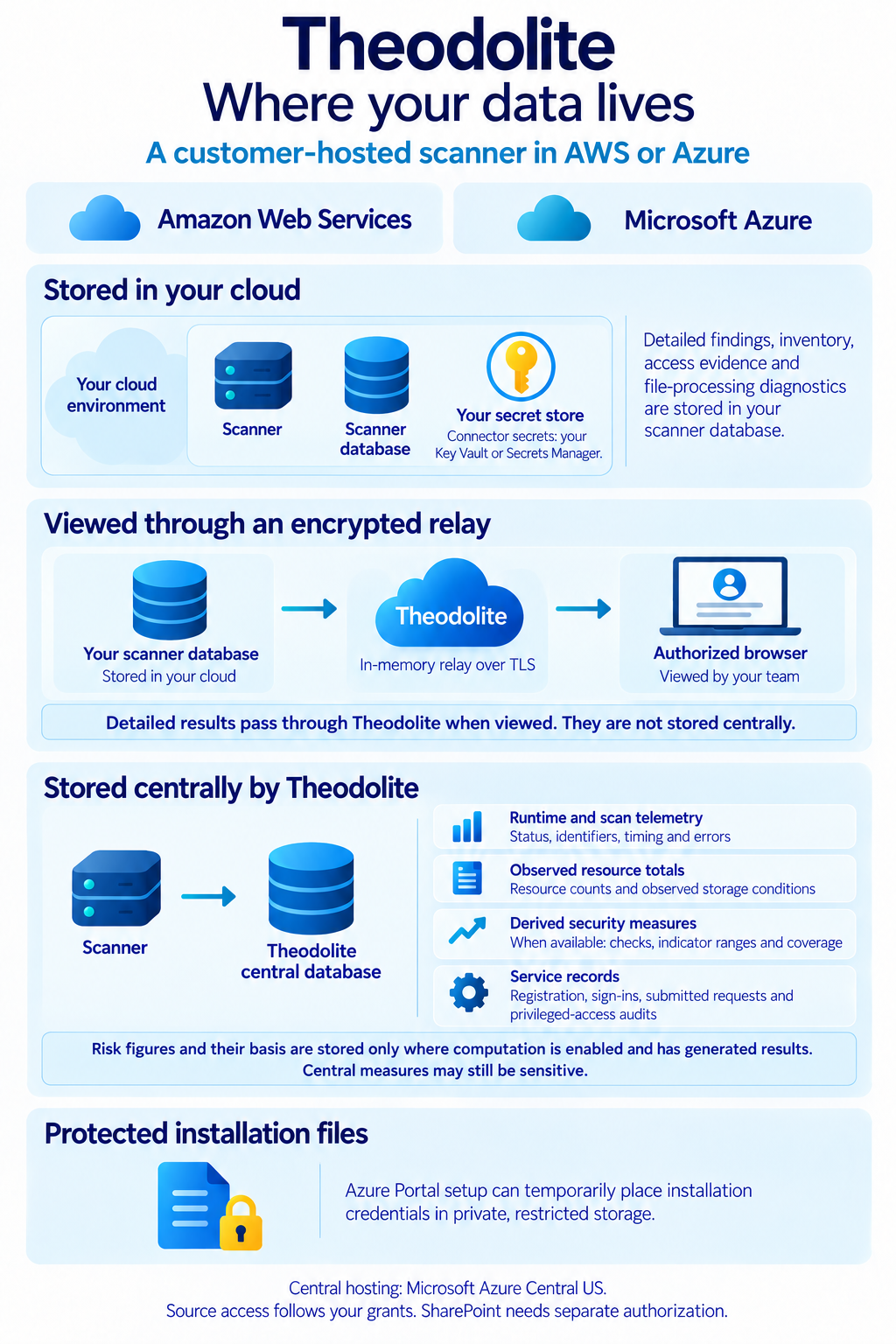
Customer-held findings, the encrypted viewing path, and centrally stored information.
View full-size guide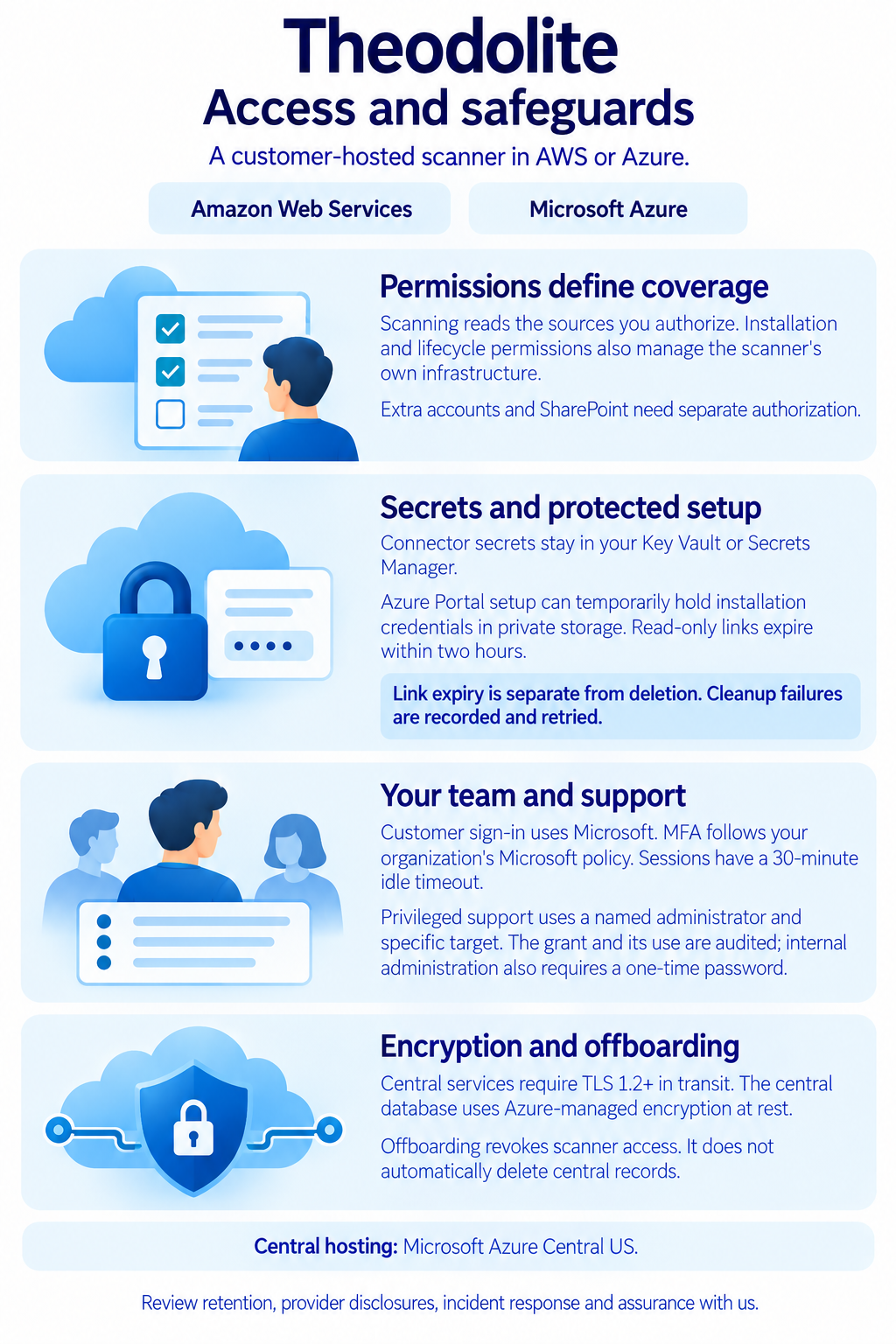
The permissions and protections that apply to scanners in AWS and Azure.
View full-size guideThe security overviewFour pages covering storage, credentials, access and retention questions.
Download PDFSecurity review
Questions about custody, permissions, retention, external services or assurance documentation? Request a deployment-specific review.